
In this post we're going to demonstrate how to build a reactive AI agent using the LangGraph framework integrated with LangChain’s Tavily search tool. This demo guides you through creating a react-style agent using create_agent(), connecting it to a real-time web search function, and invoking the agent to respond dynamically to user queries. The focus is on showcasing how LangGraph enables modular, tool-enhanced agent workflows for tasks that require external information retrieval and context-aware decision-making.
Prerequisites: Tavily key, OpenAI API key
Tools required: Python
Step 1 is to install required packages.
Step 2, import necessary libraries
Step 3, import your required API keys
Step 4, set up LLM code
Next, in step 5 we implement the search tool (Note the @tool decorator)
Next, we create_agent
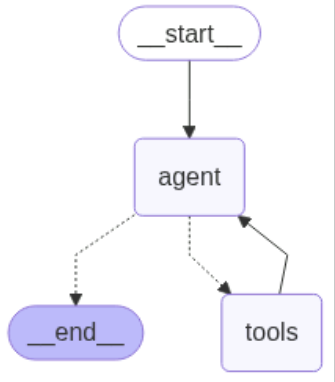
Now, we can visualize the graph by calling the agent:
Finally, we can call the agent like so (Execute the agent WITH the search tool):
Or with pure LLM reasoning, like this:
By following these steps, you have successfully built a reactive AI agent with LangGraph, integrated LangChain’s Tavily search, created it via create_agent(), connected real-time web search, and invoked it to respond dynamically to user queries—showcasing LangGraph’s modular, tool-enhanced workflows for external retrieval and context-aware decision-making.